Having a website is not enough to bring visitors to your business. Your website also needs to be search engines to well understand and easy for people to use. This is where SEO-friendly website practices become very important.
An SEO-friendly website has a best chance of appearing in search good results when people search for products, services or info related to your business. The good news is that you do not always need advanced technical good knowledge to check whether your website is full SEO-friendly.
In this guide, we will explain the main things you should more check and how they can affect your website’s search working performance.
What Does an SEO-Friendly Website Mean?
An SEO-friendly website is designed and all set in a way that work search engines crawl, good understand and index its all pages.
At the same time, it should provide a very easy experience for views.
Some more important areas of an SEO-friendly website include:
Mobile-Friendliness: The website should work complate on mobile.
Website Speed: Pages should load fast so visitors do not exit because of very slow loading.
Simple Website Structure: Users and search engines should be able to move through the website use simple.
Useful Content: Content should answer the earro and needs of your main target audience.
SEO-Friendly URLs: Page URLs should be clear and related to the page tital.
Proper Meta Tags: Page titles and descriptions should explain what all page is about.
Internal Links: Related all web pages should be connected to help users and search engines find details.
How to Check if Your Website Is SEO-Friendly
1. Check Your Website’s Mobile-Friendliness
A large number of people use mobile to browse sites. If your website does not display complate on smaller screens, visitors may leave fast.
Open your website on devices and check:
• Is the text easy to read?
• Do images fit properly on the screen?
• Can users click buttons without difficulty?
• Does the menu work correctly?
• Do forms work properly on mobile?
A responsive website should fully automatically adjust its design according to the visitor’s screen size.
2. Check Your Website Loading Speed
Website speed is an important part of both SEO and user experience. A slow website can frustrate visitors and may affect how they interact with your web pages.
Check whether:
• Your homepage loads quickly.
• Images are properly compressed.
• Unnecessary plugins or scripts are removed.
• CSS and JavaScript files are optimized.
• Your website uses reliable hosting.
You can use tools such as Google Page Speed Insights to check website work and identify areas that need add.
3. Check Your Website URLs
Your URLs should be more simple and understandable.
For example:
Good URL:
example.com/seo-services
Less Helpful URL:
example.com/page?id=12345
A clear URL gives users and search engines an new idea of what the page. Try to keep URLs short and focused on the main tital of the page.
4. Check Page Titles and Meta Descriptions
Every important main page on your website should have a new title and meta description.
The page title tells search and users what the page is all details. The meta description provides a short description that can encourage people to click your output in search.
For example, if you provide SEO best services, your title could be:
SEO Services for Businesses | Scrupulous Technology
The description should simple explain the service and give users a main reason to visit the page.
Avoid using the same title and description on every page.
5. Check Your Headings
Headings help well organize your content and make it easier to all read.
Your main page topic should very normally use an H1 heading. Other sections can use H2 and H3 headings.
For example:
H1: How to Improve Website SEO
H2: Why Website SEO Matters
H2: SEO-Friendly Website Tips
H3: Improve Website Speed
H3: Optimize Images
Do not add headings only to place keywords. Use them naturally to organize useful information.
6. Check Your Website Content
Good SEO starts with useful content.
Ask yourself:
• Does each page provide useful information?
• Does the content answer common customer questions?
• Is the data easy to understand?
• Are keywords used naturally?
• Does the content match what people are searching for?
Avoid adding keywords repeatedly just to rank up. Search engines are best at understanding language, so focus on helping the reader first.
7. Check Internal Links
Internal links connect one page of your website to another web page.
For example, a blog about SEO can naturally link to your SEO service. A blog about e-commerce can link to your e-commerce development service.
Internal links can help visitors find related database and make it easy for search engines to understand the relationship between your pages.
Make sure your important pages are not difficult to reach from other parts of your website.
8. Check Images and Alt Text
Images can make your website more attractive, but they should also be optimized properly.
Check whether:
• Images are compressed before uploading.
• Image file names are meaningful.
• Images have appropriate alt text.
• Large images are not slowing down the page.
Alt text helps describe an image when it cannot be displayed and also provides additional context about the image.
For example:
Good: seo-friendly-website-analysis
Less Helpful: IMG12345.jpg
9. Check for Broken Links
Broken links can create a poor experience for visitors. They can also make it harder for search engines to crawl your website properly.
Check your website regularly for:
• Broken internal links
• Broken external links
• Pages returning 404 errors
• Incorrect redirects
If you find a broken link, update it, remove it, or redirect the page when appropriate.
10. Check Your Website Security
Your website should use HTTPS instead of HTTP.
HTTPS helps protect details exchanged between the website. Most modern browsers also show security warnings when a website is not complate secured.
Check that:
• Your SSL certificate is active.
• Your website opens with HTTPS.
• HTTP pages redirect correctly to HTTPS.
• Images and other resources also load securely.
11. Check Your XML Sitemap
An XML sitemap helps search engines which important pages are available on your website.
Make sure your sitemap:
• Includes important pages.
• Does not contain unnecessary or broken URLs.
• Is updated when your website changes.
You can also submit your sitemap through Google Search Console.
12. Check Robots.txt
The robots.txt file provides full instructions to search engine about which areas of a website they can or cannot use.
A wrongly configured robots.txt file can sometimes prevent pages from being.
Review the file carefully and make sure you are not accident pages that you want search engines to index.
13. Check Your Website in Google Search Console
Google Search Console is one of the most useful free tools for checking website SEO.
It can help you understand:
• Which keywords bring visitors to your website.
• Which pages appear in Google search.
• Indexing problems.
• Mobile usability issues.
• Search performance.
• Core Web Vitals and other technical information.
Checking Search Console daily can help you identify SEO problems before they become bigger issues.
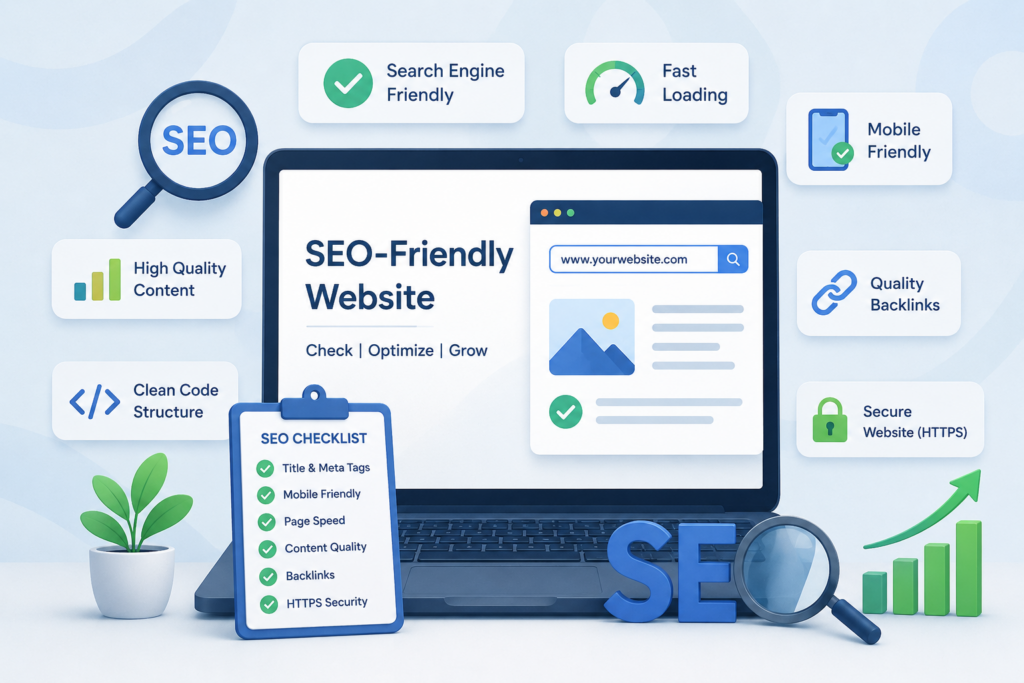
Simple SEO-Friendly Website Checklist
Before considering your website SEO-friendly, check the following:
• Mobile-friendly design
• Fast loading speed
• Clear website navigation
• SEO-friendly URLs
• Unique page titles
• Useful meta descriptions
• Proper heading structure
• Helpful and original content
• Optimized images and alt text
• Internal linking
• No major broken links
• HTTPS security
• XML sitemap
• Proper robots.txt configuration
• Google Search Console setup
Common SEO Problems to Watch For
Even a well-designed website can have SEO problems.
Some common issues include:
• Pages loading too slowly.
• Website not working properly on mobile devices.
• Duplicate page titles and meta descriptions.
• Thin or outdated content.
• Too many unnecessary plugins.
• Broken links and 404 pages.
• Missing image alt text.
• Poor website navigation.
• Important pages not being indexed.
• Keyword stuffing.
Regular SEO checks can help you find these problems and improve your website over time.
Tips to Keep Your Website SEO-Friendly
SEO is not something you check only one time. Websites change regularly, and new SEO issues can appear after adding pages, plugins, images, or other features.
Here are some simple tips:
Update Your Content: Review old pages and update information when needed.
Monitor Website Speed: Check your website performance regularly.
Check Mobile Experience: Test important pages on different screen sizes.
Review Search Performance: Use Google Search to understand how your website is work.
Fix Technical Issues: Resolve broken links, indexing problems and other errors.
Create Helpful Content: Publish content that answers real questions from your user.
Keep Your Website Secure: Maintain your SSL, CMS, plugins and all themes.
Conclusion
Checking whether your web is SEO-friendly does not have to be end. Start with the base: make sure your website works good on all devices, loads fast, has useful content, uses clear URLs and can be easily by search engines.
You should also daily check technical issues, broken links, indexing and search performance work. Small improvements made daily consistently can make a meaningful difference to your website visibl and user experience.
If you need help improving your website’s SEO, Scrupulous Technology can help with website optimization, technical SEO, on-page SEO, content optimization and other digital solutions designed to support your online growth.