
A PRACTICAL GUIDE FOR OPERATIONS AND FIELD TEAMS
An offline mobile app can let your team read selected information or save agreed tasks without a reliable internet connection. Before development, decide which tasks must work offline, what may be stored on a device, how changes will sync and which actions must wait for online confirmation.
For sales visits, inspections or service jobs, the important question is often simple: can a person finish their work when the signal drops? Start with that task rather than a long feature list.
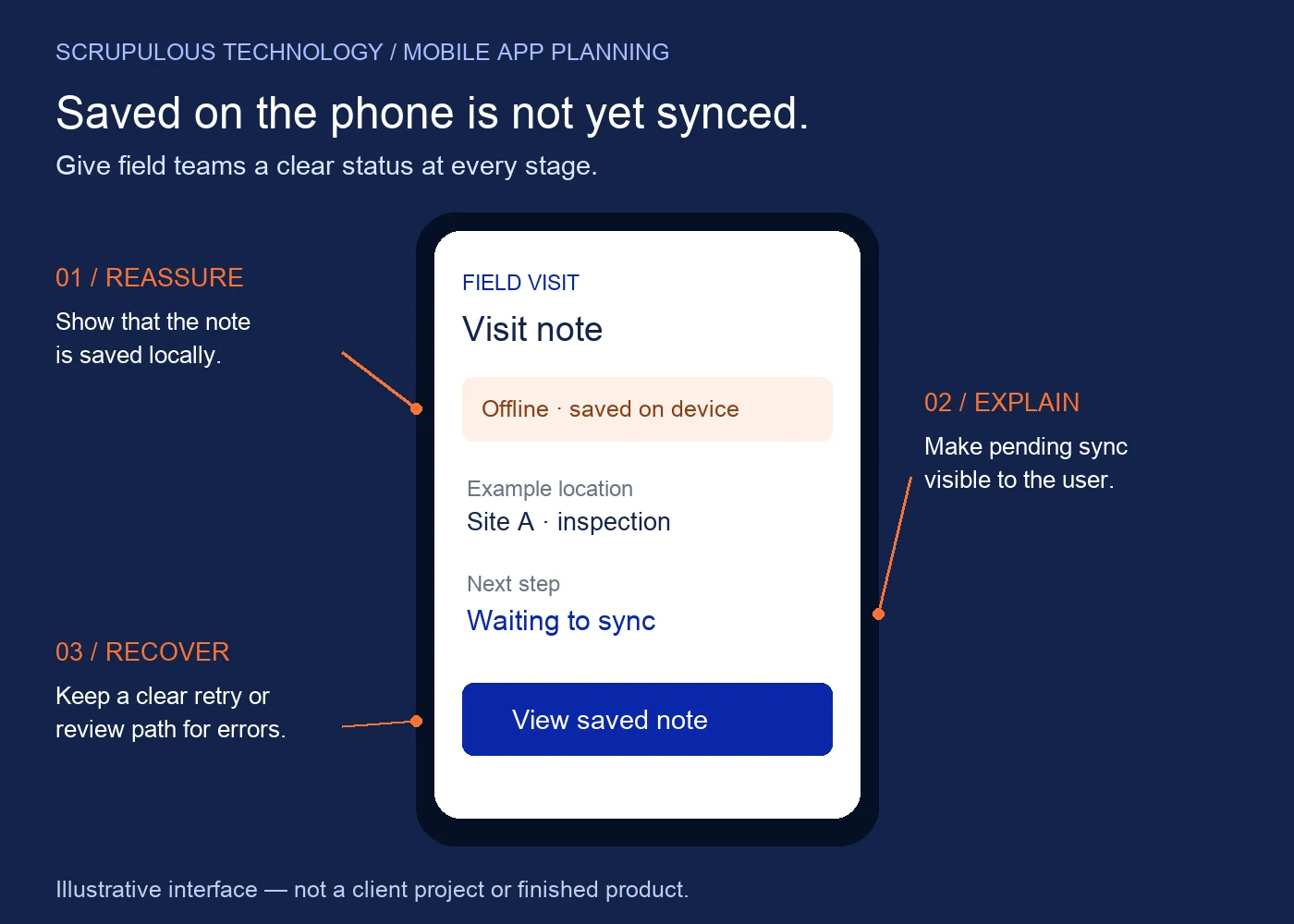
Start with one field task
Imagine a service technician completing an inspection at a site with poor reception. They need the assigned job details, a few checklist questions and somewhere to record their observations. The office needs a reliable record later.
In this planning example, the app might download the assigned job before departure and save the inspection locally. It should tell the technician what has been saved and what still needs to reach the server. This is a proposed workflow to discuss, not a claim about an existing Scrupulous Technology deployment.
A useful starting requirement: “A technician can save an inspection note without a connection, see that it is waiting to sync and later confirm whether the office received it.”
Choose what can happen offline
Google’s Android offline-first guidance distinguishes local and network data, explains different write strategies and highlights conflict resolution. Offline reading and offline editing are separate requirements. You do not have to enable every action without internet.
- Read selected information
- Consider assigned tasks, approved instructions or a selected catalogue. Agree when this information expires and show when it was last refreshed.
- Save a draft or completed task
- Decide whether notes, photos or checklist answers may be saved locally. Define what “saved” means and whether the user can edit the record while sync is pending.
- Require online confirmation
- For actions needing current information or approval, consider keeping final confirmation online. Examples to assess include reserving stock, accepting a changed price or authorising a refund. A draft request is different from an approved transaction.
Make sync status understandable
When a connection returns, local changes may need to be reconciled with server records. Two people can change the same record, so the team needs a conflict policy before implementation. A recent timestamp alone may not represent the correct business decision.
For the inspection example, use plain labels with agreed meanings:
- Saved on device: the note is stored locally; the office may not have it yet.
- Waiting to sync: the app has an update to send when its sync conditions are met.
- Synced: the receiving system has acknowledged the update under the agreed workflow.
- Needs review: an error or conflicting change needs a clear next step.
Do not use a success message for both local saving and server acceptance. Decide who can retry, resolve a conflict or ask the office for help. Include these messages in the interface design, not only in technical documentation.
Plan the device and existing-system boundaries
Ask operations and IT to agree which records each role needs on the phone. Consider shared devices, sign-out, device loss, storage limits and what should happen to pending work when access is revoked. Select device controls and data-handling rules with the people responsible for them.
If the app connects to a CRM or ERP, identify the owner of each record and check the available APIs. Discuss authentication, validation, duplicate prevention and how rejected updates are explained. Integration depends on what the existing system supports; adding an offline screen does not by itself make an ERP accept offline transactions.
Our software requirements brief guide can help you organise the users, workflow and system information for this discussion.
Test the interruption, not just the happy path
A pilot should use representative devices and a realistic task. Agree the expected outcome before each check:
- Open assigned information after turning off the connection. Check what is available and what is clearly marked unavailable.
- Save a note, close the app and reopen it. Check whether the saved task and its status remain understandable.
- Restore the connection. Verify the receiving system’s record and acknowledgement, not just the disappearance of a loading icon.
- Repeat an interrupted sync. Check that retries do not create duplicate business records.
- Change the same record in the office. Check the agreed conflict or review path.
- Attempt the task with an expired session or changed access. Check that the app handles it according to the approved rules.
This is a starting set of acceptance checks. Photos, long offline periods, platform restrictions and background activity may need additional testing.
Questions before requesting a quote
Will offline support increase the project scope?
It can. Local storage, sync rules, recovery messages, conflicts and device testing add decisions and implementation work. Ask for these items to be stated explicitly in the proposal instead of assuming that every screen works offline.
Can we add it to an existing app?
Possibly, after reviewing the app’s architecture, source access, backend APIs and required workflow. Start with one important task and assess the changes needed on both the device and server.
Should Android and iOS behave identically?
Agree the business outcome for both platforms, then validate it on each. Supported devices, operating-system behaviour and integration constraints need to be considered in the project plan.
Discuss the task your team needs to complete
Scrupulous Technology in Vadodara designs and develops mobile applications around client requirements. Explore our mobile app design and development service for the wider project scope.
For a focused conversation, bring one field task, the records involved, the devices your team uses and the system that should receive the result.
Discuss your field-app requirements
Technical reference: Android Developers: Build an offline-first app. Business examples and planning questions are illustrative recommendations; final behaviour depends on the agreed scope and existing systems.
Planning a project for your business? Explore our mobile app design and development or discuss your requirements with Scrupulous Technology. Share your goals, current systems and required features so our team can review the scope and next steps.